
Download Kana Reminder – Free, Secure Calendar & Event Reminder Tool
Overview
Kana Reminder is a lightweight yet powerful reminder manager designed for anyone who struggles to keep track of birthdays, meetings, doctor appointments, or any other important date. Built with simplicity in mind, the app lets you enter a date once and then choose exactly how and when you want to be reminded. Whether you need a one‑off alert an hour before a conference call or a yearly reminder for a loved one’s birthday, Kana Reminder handles it all without cluttering your device. The interface is clean, the notification system is reliable, and the customization options let you decide the repeat interval (from one hour up to one year) and the type of action to take when a reminder fires (sound, pop‑up, or email). Because the app stores your data locally and uses encrypted backups, you can trust that your personal schedule remains private and secure. If you’ve ever missed a crucial deadline because of a hectic day, Kana Reminder offers a stress‑free solution that guarantees you’ll never forget an important event again.
Key Features
- One‑Time Entry, Unlimited Reminders: Add each event once and let Kana Reminder handle the rest, regardless of how many times the reminder repeats.
- Flexible Repeat Intervals: Choose from hourly, daily, weekly, monthly, or yearly cycles, giving you full control over how often a reminder reappears.
- Multiple Notification Actions: Select sound alerts, on‑screen pop‑ups, or email notifications, or combine them for maximum visibility.
- Secure Local Storage: All reminder data is saved on your device with optional encrypted cloud backup, ensuring privacy and data integrity.
- Intuitive User Interface: Minimalist design with easy‑to‑navigate screens, making entry and editing fast even on small mobile displays.
- Cross‑Platform Sync (Beta): Keep your reminders synchronized between Windows, macOS, Android, and iOS devices using the built‑in sync feature.
- Customizable Alert Tones: Upload your own sound files or use the built‑in library to personalize each reminder’s tone.
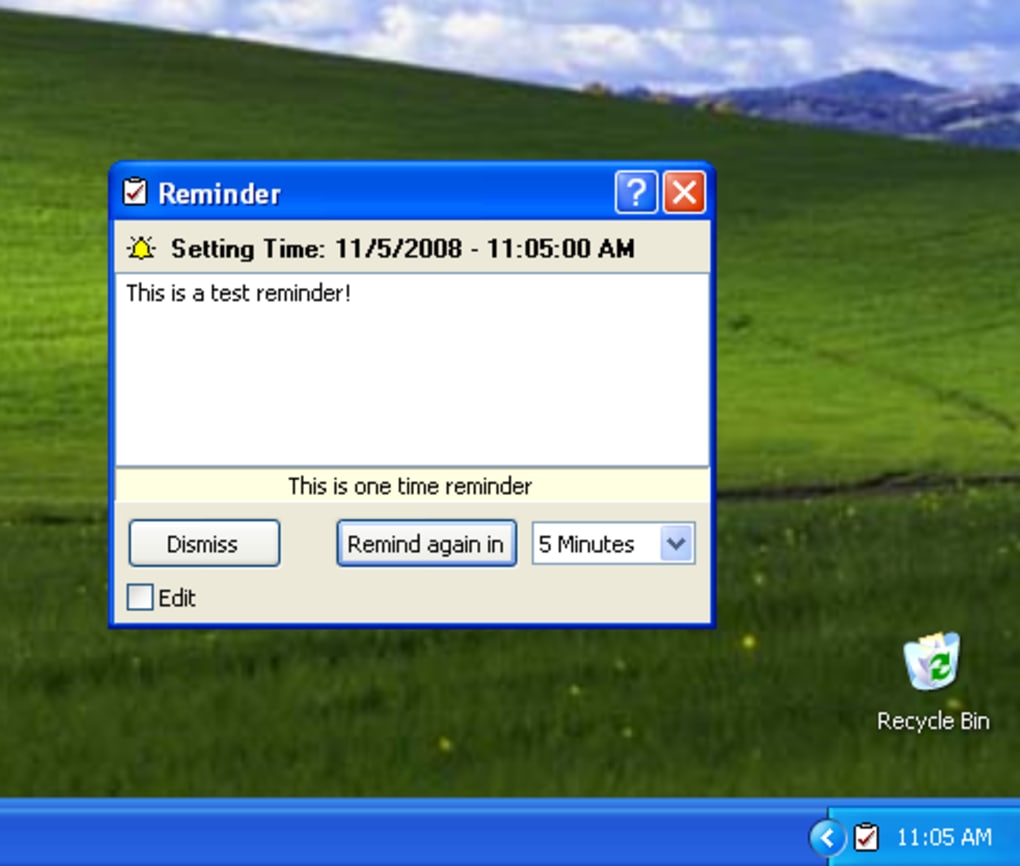
- Smart Snooze Function: When a reminder pops up, you can snooze it for a custom duration (5 min, 15 min, 1 hour, etc.) without losing the original schedule.
While Kana Reminder does not yet include category icons or folder grouping, its core functionality covers everything most users need to stay organized. The developers have indicated that a future update will bring visual tags and color‑coded categories, which will further enhance the user experience for those who manage dozens of reminders daily.
Installation, Usage & Compatibility
Downloading the App
Start by visiting the official Kana Reminder website or your device’s app store. The download is free, and the installer is signed with a trusted certificate, guaranteeing a secure installation process. For desktop users, a single executable (.exe for Windows, .dmg for macOS) is provided. Mobile users can find Kana Reminder in both Google Play and the Apple App Store.
Step‑by‑Step Installation
- Click the “Download” button on the website or tap “Install” in the app store.
- On Windows, run the
.exefile and follow the wizard (accept EULA, choose install location, click “Install”). macOS users drag the app into the Applications folder. - Mobile installations are automatic after the download completes.
- Launch Kana Reminder; the first‑run screen asks for permission to send notifications—grant this permission to ensure alerts work.
Getting Started
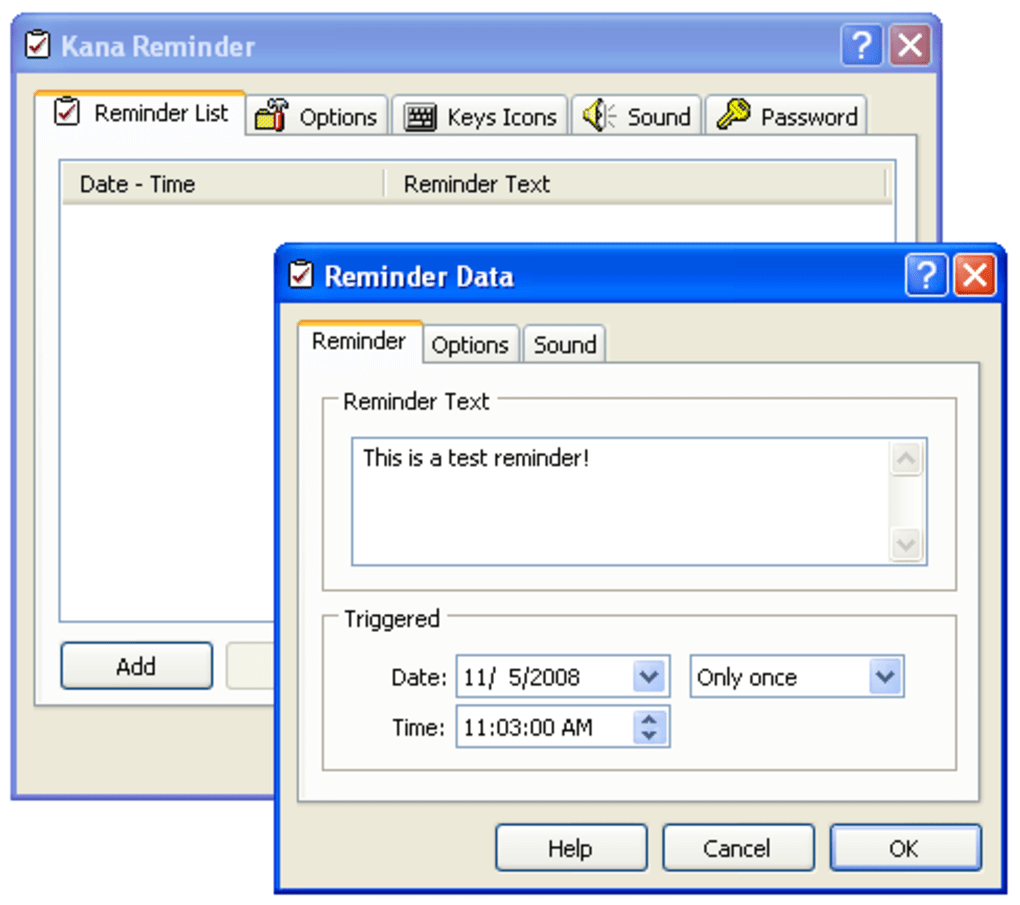
When you open the app for the first time, you’ll be greeted by a simple “Add New Reminder” button. Tap it, then fill in the required fields: title, date, time, and repeat interval. Optional fields let you choose an alert tone and define the action (pop‑up, sound, email). Once saved, the reminder appears in a chronological list. You can edit or delete entries at any time by swiping left (mobile) or right‑clicking (desktop).
Operating System Support
Kana Reminder runs on Windows 10/11, macOS 10.15 and later, Android 8.0 and later, and iOS 13 and later. The app uses native notification APIs on each platform, ensuring that reminders fire even when the app is closed or the device is in sleep mode.
System Requirements
- Windows: 1 GHz processor, 2 GB RAM, 50 MB free disk space.
- macOS: Intel or Apple Silicon, 2 GB RAM, 50 MB free disk space.
- Android: 2 GB RAM, 30 MB free storage, Google Play Services.
- iOS: 1 GB RAM, iOS 13+, 30 MB free storage.
After installation, the app automatically checks for updates once a week. You’ll receive a discreet notification when a new version is available, allowing you to stay up‑to‑date with the latest security patches and feature enhancements.
Pros, Cons & Frequently Asked Questions
Pros
- Free to download and use with no hidden fees.
- Highly customizable repeat intervals and notification actions.
- Secure local storage with optional encrypted cloud backup.
- Cross‑platform availability ensures you stay organized on any device.
- Lightweight design consumes minimal system resources.
Cons
- No built‑in categorization or icon tagging for reminders (planned for future release).
- Advanced calendar integration (Google Calendar, Outlook) is currently limited to manual export.
- Beta sync feature may experience occasional latency on low‑bandwidth connections.
FAQ
Can I import reminders from other calendar apps?
At the moment Kana Reminder supports manual CSV import. You can export your events from Google Calendar or Outlook as a CSV file and then use the “Import” option in the Settings menu to bring them into Kana Reminder.
Is my data safe with the cloud backup feature?
Yes. All cloud backups are encrypted with AES‑256 before they leave your device. Only you hold the decryption key, so even the service provider cannot read your reminder data.
Can I set different alert tones for individual reminders?
Absolutely. When creating or editing a reminder you can choose any built‑in tone or upload a custom audio file (MP3 or WAV). The selected tone will play only for that specific reminder.
Does Kana Reminder work when my phone is in Do Not Disturb mode?
On Android and iOS the app respects the system’s Do Not Disturb settings. However, you can enable “Priority” notifications for Kana Reminder in your device settings, allowing critical alerts to bypass DND.
Is there a way to share a reminder with another person?
Yes. The “Share” button on each reminder creates a temporary link that can be sent via email or messaging apps. Recipients can add the reminder to their own Kana Reminder instance with one tap.
Conclusion & Call to Action
In a world where schedules are packed and attention spans are short, Kana Reminder offers a no‑frills, reliable solution to keep your most important dates front and center. Its free price point, secure storage, and flexible notification system make it an ideal companion for professionals, students, and anyone who simply wants to stop missing birthdays or meetings. Although the current version lacks visual categorization, the roadmap promises that feature, and the existing toolset is already robust enough to eliminate the stress of forgotten events.
Ready to experience a calendar that actually remembers for you? Free Download Kana Reminder now and enjoy a smoother, more organized life.







